Time Machine: Ass Saving. Boot Camp: …An Adventure?

My MacBook Pro like my Mac Pro, is being backed up hourly by Mac OS X Leopard‘s “Time Machine” backup system. For the first time since installing Leopard on either of my Macs, I had need to put its full-restore capability to the test. I laid my trust in its ability to fully restore my system and…did it bite me? Nay! It worked perfectly. My MacBook Pro now looks just like it did when the last backup occurred. Wonderous.

Less nice is the sequence of events that invited me to put Time Machine to the test. I have OS X’s “Boot Camp” feature to thank for this.

I recently described the saga of getting Boot Camp going on my Mac Pro. The desire to play a certain Windows-only game [ via Wayback Machine ] with my wife on the comfort of our couch lead me to setup Boot Camp on the MacBook Pro, as well. So I cleaned up my boot volume and began the now-familiar Boot Camp setup drill.

It is here that I will say that rather near the top of the list of times when one would very particularly not be interested in experiencing a kernel panic would have to be when one’s OS is in the middle of performing a live re-partition of said OS’s boot volume. Sadly, such tragedy befell me early in the weekend. The result? Roughly one quarter of my MacBook Pro’s internal, 100GB drive became some sort of nether-partition that, after repeated attempts, I could not reclaim. Since low-level formats are a thing of the SCSI past, I was thinking I would actually have to go out and purchase a new drive. But finally, jiggering about removing and adding and adjusting the partition map in Disk Util forced said nether-partition to slacken its icy grip on one quarter of my hard drive. A tidy, little 14GB Windows XP partition now sits along side my Leopard partition. Things are in order.

So about six hours of my weekend was burned in getting things back to happy on my beloved laptop. It did necessitate a jaunt into the district to retrieve my Time Machine backup drive from the office, as I’d heard that a full restore can take hours to complete and since this Mac that I ferry in to and out of the office daily is my development workstation, I couldn’t afford to start the restoration drill on Monday morning (after all, office time is all about fully productive web development from arrival to COB). I’ve got a photo of my daughter dancing gaily upon our meeting room table to prove it. But, thankfully, all is right with the world once again.
Posted in Macintosh | 1 Comment

Epson PX-8 As Mac OS X Dumb Terminal

Let me first say “no.” I am not in the process of transforming this retro computing blog of mine into Byte Cellar: All Things As Mac OS X Dumb Terminals. Honest!

But yes, I do seem to suffer from a woeful addiction. I admit it to you, my readers. (I can feel a weight lifted already.) And the undeniable evidence of this addiction? I’ve wired up yet another vintage system as a dumb terminal to Mac OS X. Hey — third time’s the charm, right?

First, a bit about the vintage system in question. Both of my regular readers may recall that about six months ago I was intrigued by what I heard of Earl Evans’ interest in and restoration efforts concerning one of the first laptop computers, the Epson PX-8 “Geneva” (circa 1984), on his Retrobits podcast. I remembered the unit well thanks to a review I read of it back in 1984 in an issue of Computers & Electronics magazine. In fact, I still had the magazine on hand so I dug it out and scanned in the review, along with a nice two-page Epson PX-8 advertisement. I was pleased to hear back from Earl who rather enjoyed having the review to read and let me know that new-in-box PX-8s were still available for purchase from Star Technology! And, of course, I did.

The PX-8 is a great little machine. It weighs 5 lbs, features an 80-character by 8-line LCD display with angle adjustment, is powered by a Z-80 compatible CMOS CPU, runs CP/M 2.2 out of ROM and runs for 15 hours per charge. It comes with several extremely basic apps on-board (including BASIC, actually), and additional programs can be added by way of pop-in ROM chips or via floppy, if you’re fortunate enough to have gotten your hands on an elusive FP-10 floppy drive. Epson sold the PX-8 for $999 back in its day.

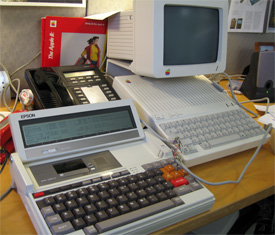
I brought the unit in to the office some time ago to fiddle with occasionally during free time at lunch. I noticed it sitting there the other day, next to my Apple //c which acts as a dumb terminal tied to my MacBook Pro when it occurred to me that I had an oldschool Mac mini-DIN 8 serial cable tucked in a drawer here…and that the PX-8’s RS-232C port is likewise a mini-DIN 8…. After a few minutes of hunting down pinouts on the web and sketching out a crude null-modem signal mapping by hand I pulled out the Swiss Army knife and started stripping cable. I was at work and had no soldering iron on-hand, so it was twist, twist, twist and time to cross the fingers. I connected the PX-8 to my USB-to-serial converter, opened an 80×8 terminal window in Mac OS X, issued the magic commands and voila!

It’s not a particularly ideal terminal — I don’t believe the system’s terminal app is even VT-52 compliant. Like the eMate 300 I put through the same drill, I don’t picture the PX-8 being a permanent fixture in the office. But hey, it was a fun way to spend lunch!

I hope you enjoy the photos.

Posted in Other Platform, Serial Terminal | 7 Comments

A Boot Camp Setup Crysis

I’ve had my Mac Pro for nearly a year now. What a great workstation, chock full of 3GHz Xeon goodness — four cores worth. It’s run Mac OS X exclusively, with the exception of brief forays into old school OPENSTEP goodness via Parallels. I had never installed Windows under Parallels or Boot Camp as I never had the particular desire to shell out several hundred dollars for a Microsoft operating system for which I had no need. But, as I’ve been doing lots of console gaming of late, I’ve kept my eye on the gaming scene in general and confess that the phenomenal looking Crysis for Windows caught my attention. Crysis demands more from the host hardware than likely any game ever made, and it occurred to me that my quad Xeon box with its ATI X1900 XT could probably deliver a half-decent Crysis experience, even if the high-end graphics card is getting a little old to be on the absolute bleeding edge of gaming. When I found from my employer that I qualified for a license to install XP Pro at home, I decided to Boot Camp my Mac Pro.

The setup experience was not a horribly smooth one.

My first step was to swap a larger Seagate (500GB) into one of the Mac Pro’s drive bays. I then began the Boot Camp process, allocating 100GB of that disc to Windows. Partway through the install, I was faced with the first Blue Screen of Death my trusty Mac Pro had ever been forced to share with me.

A problem has been detected and windows has shutdown to prevent damage to your computer.

IRQL_NOT_LESS_OR_EQUAL

If this is the first time you’ve seen this stop error screen, restart your computer. if this screen appears again, follow these steps:

Check to make sure any new hardware or software is properly installed if this is a new installation, ask your hardware or software manufacturer for any windows updates you might need.

If problem continues, disable or remove newly installed hardware or software. Disable BIOS memory option such as caching or shadowing. If you need to use safe mode to remove or disable components, restart your computer, press F8 to select start up, options, and select safe mode.

Technical information:
STOP: 0X0000000A (0X00000010, 0X000000002, 0X00000000, 0X8051AA58)

Oy. A little googling revealed that installing Windows XP via Boot Camp requires the use of an install disc containing Windows XP SP2. Likely the disc I had been given was an earlier version. What to do?

I found that I could generate an SP2 install disc from what I had been given by way of a process known as “slipstreaming.” It requires that one have a Windows PC on hand (which I do) and involves copying the contents of the XP install CD to a directory, downloading the Windows XP SP2 update installer to that PC, merging the contents of the installer with the XP install files, and writing out a bootable Windows XP install CD that contains Windows XP SP2. I found a solid guide which helped me along. (How it pains me to admit that I found anything generated by Paul Thurrott to be helpful to me — what an asshat that guy is.) I was glad to find that Nero Burning ROM v8 (at the time of this writing) has a time-limited trial download available.

With the new disc in hand the install was a breeze. I got XP SP2 up and running, installed Apple’s Mac Pro XP drivers, grabbed the latest version of DirectX 9, installed Crysis and I was all set. And what a great looking game it is. I’ve not had but so much time to fiddle with various setup configs, but it seems that I can run the game with most settings on “HIGH” at a resolution of 1280×800 for a nice, smooth game session on my 30-inch ACD. I look forward to spending more time playing Crysis and tweaking its config for optimum visuals / performance. [ UPDATE: I found an excellent guide to tweaking out the Crysis config files to achieve the visuals / performance sweet spot. ]

Now if I could only figure out how to get XP and the ATI video drivers to properly rotate the image on my secondary, portrait display….

Posted in Macintosh | 10 Comments

JPEG: The New Graphics Format On The Block

Any regular readers here know that I’ve owned a lot of machines in my time. It was 1993 when I called an Amiga 1200 my main machine and when JPEG images started appearing on BBSs across the land. You know, JPEGs. They’re the most commonly used image format on the net, but at one time they were a new curiosity.

JPEGs were fun on the Amiga because they support “true color” — 24 bits per pixel of it (16.7 million colors in all) and the Amiga 1200 supports a near-true color mode with it’s HAM8 graphics mode. I recall downloading, with much excitement, various JPEG images I would find on BBS’s here and there for viewing as a means to “show off” what the Amiga 1200 could do. These images were scarce, and every one I downloaded I uploaded to the local Amiga BBS, known as “The Board” (Hampton, VA area). I was trying to make The Board a repository for these great, new sort of images. JPEGs were so rare, it seemed a noble effort. (Some names I recall from The Board: Myron Sothcott (sysop), Pat Birkmeyer, Norm Goswick — all part of our local Amiga user group at the time, A.L.F.A. or Amigoid Life Form Association. And yes, I hope Google brings them here and inspires a comment or two; I’ve not heard form these folks in 15 years.)

The JPEG viewers I had for my Amiga 1200 would render the images in HAM8 mode at 640×480 pixels. Back then was a pretty high resolution. I recall it took about two minutes to fully render the JPEG to the screen using its 14.3MHz Motorola 68EC020 processor. That’s pretty amazing when you consider that modern machines can decode a JPEG in about the same time it takes to decode an uncompressed .BMP or .TIFF image — that is: instantly.

Did my efforts help make JPEG a standard in today’s web world? Unlikely. But standard it is, and it’s interesting to recall a time when it was so strange and new a thing.

The Board is long gone now, but my computer room again contains an Amiga 1200 and an Amiga 2000, and the latter has a 56Kbps modem attached to its ASDG Zorro II dual serial board. Just to help me search for a modern-day BBS even remotely resembling The Board. An unlikely find, I must say. One can always hope, however….

::: Digg this story! :::

Posted in Multi-Platform | 8 Comments

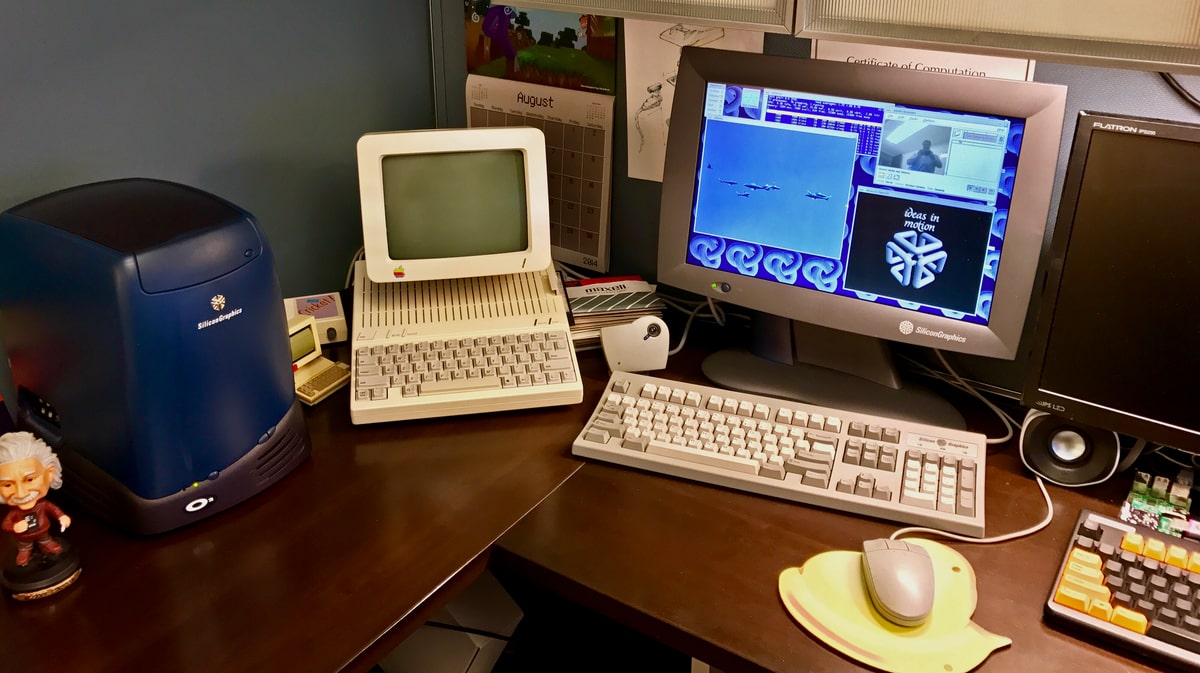
The SGI 1600SW Flat-Panel Display Saga [Updated 2024]

Back in ’03 I grabbed an SGI O2 system on eBay. I always wanted an SGI to play with (used them in the lab back in college for a bit) and it seemed the O2 was the best bang for the buck. To go with it I grabbed an almost-new SGI 1600SW widescreen, flat-panel display. 17.3-inches diagonal, 1600×1024 native resolution at 110dpi and an industrial design that’s won awards. [ Informative PDF here. ] A lovely display. The thing is, I really don’t use the O2 very often — glad to have it, but it sits idle most of the time. But that screen. What a screen….

I recently pulled my media PC out of the entertainment center and installed Ubuntu Linux on it as a second OS (XP’s on the box, as well). Just wanted to play around with Compiz Fusion, really. At any rate, it occurred to to me that the 1600SW would make a lovely display for that box. But sadly the SGI display is not DVI, but an LVDS signal. Happily, there are DVI to LVDS converters.

The best and most versatile is the SGI Multilink, an external box — but it’s costly. $400 on eBay is not an uncommon thing to see. As such, I’ve gone with a cheaper alternative: the GFX-1600SW [Archive] Multilink adapter alternative. It sits in a PCI slot (it just draws power — it’s not a graphics card) and converts a DVI signal to LVDS. Sadly, it doesn’t do much in the way of scaling non-native resolutions, but it was much cheaper than the SGI Multitlink.

In searching for information about the GFX-1600SW, I ran across a link that was 404-ing, but a trip to archive.org revealed the page. As it seemed helpful to folks trying to make modern use of the 1600SW, I’ve captured it and placed a copy here, on this site. Have a look. I tip my hat to ‘Orion,’ who created the page.

Wish me luck in this endeavor. The adapter is in the mail — I’ll let you know how things turn out.

UPDATE 2024: The Shuttle media PC was, years ago, repurposed to another family member (and has since died and been scrapped) and the SGI 1600SW lived for some time as a display on my Mac Pro. Since the Mac Pro has no PCI slots, I used a PowerPC-based “Amiga” (Sam440ep-Flex) I acquired since this post was written to power the GFX-1600SW card. It sat in that system for a couple of years just  drawing power, with video coming into it from the Mac Pro and leading out of it to the 1600SW on the desk. Quite a circuitous arrangement, if I do say so myself. 

Presently the 1600SW is on the shelf, along with the SGI O2 I originally used it with, but their last regular use role was in my DC office back in 2017

Related posts:

Posted in SGI, UNIX | Tagged , | 12 Comments

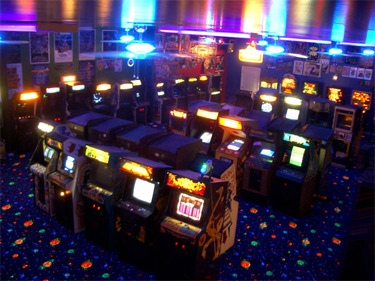
Luna City Arcade: A Retro Gamer’s Wet Dream

Peter Hirschberg is my new hero. This retro game-craving lunatic / genius has placed upon this earth a 60’x40′ patch of pure, unadulterated heaven. To the unwitting passer-by, this magical space may appear to be nothing more than a sizable garage, but what is contained within is almost too wonderful to be believed. I am referring to the Luna City Arcade. It is without doubt the most splendid arcade ever to have existed in this world, for within lie 57 classic arcade cabinets – from Asteroids to Zaxxon – all lovingly restored to shining perfection by Peter himself. A herculean effort, as nearly all of them came to him non-functional and in downright “disgusting” condition. (Peter’s personal fav’s are Discs of Tron, Tail Gunner, Space War and Lunar Lander.)

It is a magical place and Peter is good enough to occasionally open it up the retro game-thirsty world, hosting “Game Days” to select folks on his mailing list. I, personally, would be able to die in peace if I am ever so lucky as to spend but a few moments in so wonderful a place – a place that happily is but an hour’s journey from my Northern Virginia (DC area) home.

See the full gallery, walk-through video and interview over at Gizmodo. And Peter…I bow down to thee.

UPDATE: Peter has setup a website for the Luna City Arcade. And he’s even writing retro iPhone games! Go Peter!

Posted in Gaming | 2 Comments

New-In-Box Apple //c System Sells For $2,553

I experienced 30 minutes of intense pain this evening. I took a quick glimpse at eBay’s “Vintage Computing” listings this evening and what I saw was amazing.

Apple //c

That’s right. A new-in-box Apple //c system: main unit, monitor, monitor stand and AppleWorks integrated software package. Straight out of 1984 and never opened. Never. Opened.

    I bought this system from a collector who said he bought this from the original owner who had just stored it and never got around to opening or using it. I have stored this system for years in a smoke free and safe place since. It does show some wear from shipping and storage, which was mostly from the original owner, who didn’t understand what a rare item he was dealing with. To find a complete system unopened and never seeing human eyes before is unbelievable.

    I have never seen another unopened Apple II C system in my life, and this belongs in a museum as this is the only way to correctly portray how a new Apple system from the early years of computing would arrive.

    This is the prize of Apple and Vintage Computer collecting

When I encountered the auction there were 31 minutes left and the bid was at $920. Too rich for my blood these days, sadly. But I was racked with pain in being unable to bid. I felt a little better when I saw the final auction ending price…. $2,553.00. To lend some perspective, back in 1984 the retail price of the Apple //c main unit was $1299. A rare find that went for a rather exorbitant amount.

Still, it would be lovely to have…despite the fact that I’ve already got an Apple //c put to good use on my office desk.

Posted in Apple II | 16 Comments

I Left My Heart In San Francisco

As I start this post the Steve Jobs’ Macworld San Francisco 2008 keynote is just four minutes away. And sadly I could not make the trip this year. My trip out there for last year’s keynote, working coverage with Arn for MacRumors, was some of the most fun I’ve had in my life, but it ultimately just wasn’t in the cards for this year.

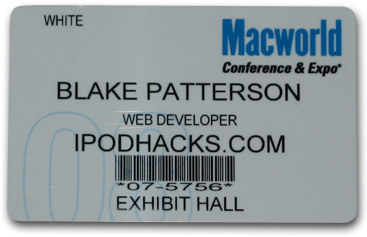
To ease the pain, I’ve taken the day off work and am sitting here watching the MacRumors Live coverage with my Macworld ID badge sitting next to my MacBook Pro. It’s still a festive day, though. I’m anxious to see what Steve has in store for us.

Happy Macworld 2008 everybody!

Posted in Macintosh | 2 Comments

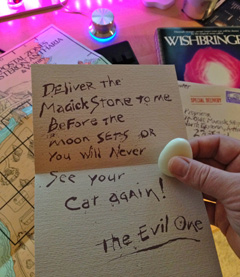
Replaying Wishbringer, Amiga Style

I purchased what I believe to be the first Amiga sold in the state of Virginia back in October 1985. To say there was a dearth of software for the platform at that time is an understatement. I ultimately sold the unit in March or April 1986 for that very reason. Well, that was part of it. At any rate, I had it for a brief time and the best game I played (and solved) on it, amazingly, was Infocom’s Wishbringer by Brian Moriarty. Yes, a text adventure. How ironic, but I loved the game.

I’ve been trying to think of new and interesting evening entertainment for my wife and me after our daughter goes to sleep, and it occurred to me that text adventures by laptop on the couch might be fun. My wife and I are both Sherlock Holmes fans and so Infocom’s Sherlock: The Riddle of the Crown Jewels seemed like a natural as did, of course, Wishbringer.

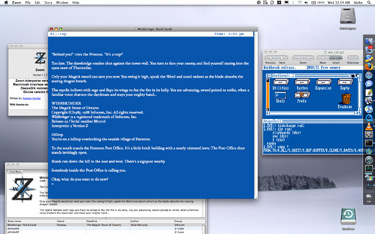
We’re starting with Wishbringer tonight as I’m still trying to get my hands on the full Sherlock game and bundle somewhere (likely as part of The Lost Treasures of Infocom II). Since I played Wishbringer on the Amiga with its distinctive white on blue Intuition interface, I wanted to try and recapture that feel on the replay. I think I’ve done a pretty good job in doing so. I grabbed the Mac Z-machine interpreter Zoom and have configured it to exactly match the default Amiga Workbench color scheme. As you can see from the screenshot, it’s pretty much there aside from the relatively pixelated Topaz font.

I think it will be a lot of fun. I’ll let you know how it goes.

Posted in Amiga | 2 Comments

Adjusting The Commodore 1702

Yesterday I was fiddling around down in the “byte cellar” for a bit and went to reconnect my Apple IIgs’s audio to the A/V switch after hijacking its cables to record a bit of Wii audio for a recent post. While I was digging around behind the machine I found a loose RCA cable tied at one end to the IIgs’ composite video jack. After wondering for a moment what that was about, I recalled that a couple of years ago someone had asked me to verify that the IIgs composite video signal was indeed color and not greyscale (Amiga 2000-style). I did so by hooking the IIgs to the neighboring Commodore 64C setup’s Commodore 1702 CRT. Yep, it’s color.

For no particular reason I reconnected the GS, which has its own 12-inch RGB monitor, to the 1702 and fired up an old 8-bit game. Looking at the display on the RGB and composite screens sitting next to each other I was reminded how much better Apple IIe-style video looks on a real composite CRT. The Woz’s “high-res” graphics mode generates color by taking advantage of NTSC artifacting using black and white pixel patterns on the 280×192 pixel screen to create four colors (other than black and white) at an effective 140×192 resolution — brilliant stuff way back when. The problem is, the IIgs RGB video output, needed to best represent the far more advanced GS-specific graphics modes, has to sort-of emulate these NTSC artifacts for IIe-mode graphics and the results just look, to my eyes (and despite the aforelinked, overexposed image of the side-by-side displays), rather wanting as compared to “the real thing” on a composite screen. So, I decided to leave the 1702 hooked to the GS, sharing it between the Apple and Commodore computers (thanks to its switched, dual inputs). But this new arrangement underscored a little issue I’d been meaning to take care of for a while now….

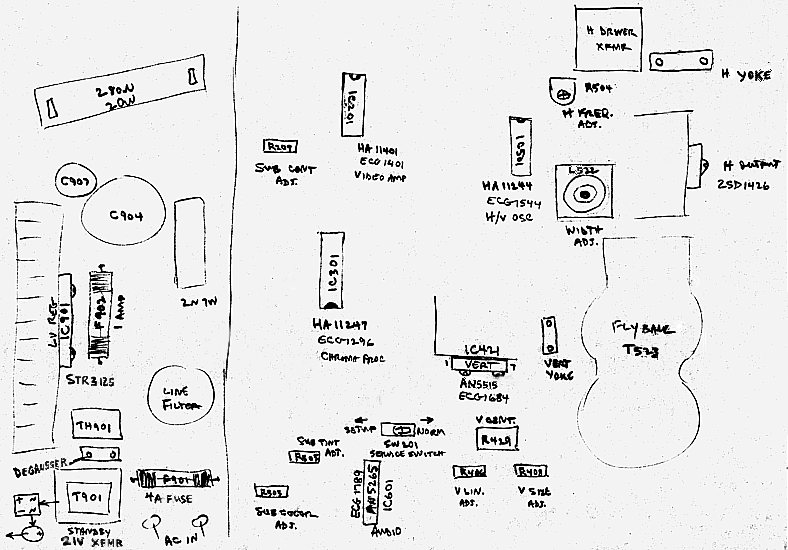
After posting several photos of the Commodore setup some time ago I received a few reader comments indicating that the image on the screen seemed to tall. Looking at a few, more familiar Apple games (when it comes to 8-bits, I was an Apple guy back in the day) on the screen last night, I was reminded of the adjustment I’d been wanting to make…and the reason I’d not yet made it: there is no “v. size” knob among the front controls or around back. This meant opening up the enclosure, grabbing my plastic CRT tools, and fiddling with pots — which I promptly did. But which pot? I found five right away, but they appeared to be unlabeled (I think they may have had labels…obscured with a 23-year-old layer of dust). So, I went online and spent a great deal of time searching for a guide to 1702 adjustments or some sort of schematic when finally I found a hand-drawn schematic and various other, useful 1702 images. Just what I needed. A little twiddling on the proper pot to the glare of a few test images and things are looking just about right, finally.

My purpose in rambling on about all this has simply been to share the link that helped me so that perhaps it can be more easily found by the next guy needing to make a few 1702 adjustments. Browse the complete directory full of related goodies.

And it’s definitely worth noting that mucking about in the innards of a CRT CAN KILL YOU!! Only do so if you’re sure you know what you’re doing!

Posted in Commodore 64/128 | 2 Comments