Andy Hertzfeld of Original Macintosh Team Designed Google+ Circle Editor

So, the big news of the week has been Google+, the search giant’s latest stab at the social network thing. I was lucky enough to get an invite early on and, I must say, I’m liking the service so far. (Here’s my Google+ profile link.) If you took Facebook and removed everything MySpace about it, and slathered it in Apple-class interface goodness, you pretty much get Google+. Twitter is by far my main social Internet thing, though I do use Facebook lightly, but have never liked the feel of it, and its feel has been going downhill for quite some time, in my opinion. I’m quite interested to see how my use of and feelings for Google+ will evolve as more people get on board.

The purpose of this post is to share something I saw on my Google+ stream earlier today that fascinated me. Andy Hertzfeld, who joined the fledgling Macintosh team at Apple in 1981 and became the primary software architect of the original Macintosh operating system, is on Google+. (I added him to my Circles!) But, what I didn’t know is that he works for Google and, what’s more, he contributed heavily to the creation of Google+ itself.

I just saw this modest post by Hertzfeld appear in my stream, where he thanks users for their positive reaction to the new service and clarifies his role in the system. I will quote part of it here.

It’s great that the user experience of Google Plus is being so well received, and I’m happy about all the positive feedback that’s been coming my way, but I’m worried that I’m getting too much credit for it, so this long-winded post is an attempt to set the record straight.

I am indeed the main individual behind the interaction design and implementation of the circle editor. I conceived, designed and implemented a compelling prototype for it almost single-handedly, and then wrote a fair percentage of the production javascript code with lots of help from my friends. I also worked on a couple of other parts of the product a little bit, but that’s pretty much as far as it goes.

Steven Levy’s excellent Wired article got the story right – I wrote the circle editor and then recently widened my focus to the overall Google Plus user experience. But subsequent stories jumped to the conclusion that I was responsible for the design of the entire product that we launched on Tuesday, which isn’t true, but I guess it was just too good a story (about Apple design values infecting Google) for people to resist. And now some people are saying that I’m responsible for the broad visual refresh now rolling out across Google, which couldn’t be further from the truth – in fact, I’m not even sure I like it.

A core feature of Google+ is the Circle system. It’s a way of grouping friends, acquaintances, and even strangers into logical bins, which can be used individually or in a combined manner to easily get your thoughts to whatever audience you desire. Family news to relatives, tech discoveries to your geek crowd, work items to officemates, etc. And, a huge part of Circles is the impressive, in-browser visual manager that lets you drag and drop folks hither and yon. It’s certainly the most striking thing about Google+, and it looks like the man who brought us the Macintosh interface so long ago is the man behind the Circle editor.

And, at Google, he even kept his old Apple job title: “Software Wizard” !

I wanted to share this, as I count Andy Hertzfeld among my short list of heroes, and it’s great to see him still sharing his magic with the rest of us. Be sure to visit his excellent Folklore.org, a trove of anecdotes from the genesis period of the Macintosh.

Posted in Just Rambling, Macintosh, Other Platform | 1 Comment

Apple //c Serial Terminal in the Byte Cellar

So, I’ve recently received a number of links in to Byte Cellar accompanied by blushworthy praises from bloggers out there. (I’m looking at you, Gnome of Retro Treasures…) They’ve made me feel bad and lazy (and maybe a little flattered). So, I scanned my YouTube uploads in search of something I’ve uploaded that should have been written up here. And the first thing I stumbled upon is the video of my Apple //c, which used to live in my dayjob office but now lives in my home basement due to my having left that whole office scene behind, doing serial terminal service to my Mac Pro.

You’ve seen this //c do serial terminal duty before, but now its doing it at home. And home is where the heart is, right?

Dig out that old machine and put it to good use, folks!

Posted in Apple II, Serial Terminal | 4 Comments

My Chance ISS Flyover Experience

Just a quickie to share a rather nifty and unexpected experience I had while on vacation at Bethany Beach, DE last week.

On an early evening in the middle of the week I was sitting outside on the third floor deck of our beach house rental with my brother in law. Full darkness was probably 45 minutes away. He was doing e-mail on his laptop and I was fiddling with my iPhone. I put the phone on the table and sat back to just relax for a while when, looking up, I saw a particularly bright light moving across the sky in a northeasterly direction.

Something about the scene immediately struck me as as odd.

As I watched it pass, I noticed that it it was a single, unblinking, bright white light. Also, it left no contrails. The speed of its travel and the “smoothness” (somehow) of its motion stood out to me. And, even after passing overhead, I detected no engine sound.

It took about 10 seconds for me to realize that I was almost certainly watching the International Space Station pass overhead. I jumped online to an ISS tracker to see where the station was currently positioned, and — that confirmed it!

It was thrilling to happen into such a clear viewing of the most complex international scientific project in history passing right over my head. There wasn’t a cloud in the sky. In all senses of the word, it was brilliant.

My dad would’ve gotten quite a thrill, had he been there to see it.

Posted in Just Rambling | 1 Comment

The iPhone 4 Rides a Kite

I am presently on vacation at the beach with the family. Bethany Beach, Delaware. Yesterday it was extremely windy and I flew my sort-of box kite that can only fly in high winds. And, then it occurred to me — why not tape my iPhone 4 to the kite?!

So I did.

I taped up all of the nooks and crannies of the device, and ended up having to reposition it a few times to allow the kite to actually fly. And I ran out of tape, so I ended up with it flopping about WILDLY, so I took a few stills from the video and assembled them in the following video. I want to mount it better (I have more tape now), but the wind was mild today. So, for now, this is all I’ve got. But it’s pretty interesting. Have a look.

If I end up with a strong wind later in the week, I’ll be sure to follow up with a proper video.

Posted in Just Rambling, Other Platform | 2 Comments

Web Browsing on the Oregon Trail

I post quite a few vintage computing photos here and over in my Flickr set, but this morning I snapped a vintage photo of a different sort. “Faux retro,” perhaps. I thought I’d share.

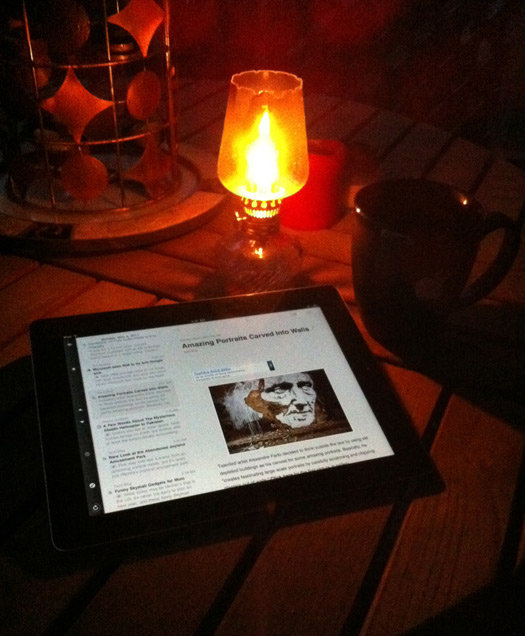
The early American iPad 2. I’m sure if the settlers had been so equipped, a quick jump over to WebMD would’ve staved off so much death at the hand of dysentery.

Posted in Just Rambling | 3 Comments

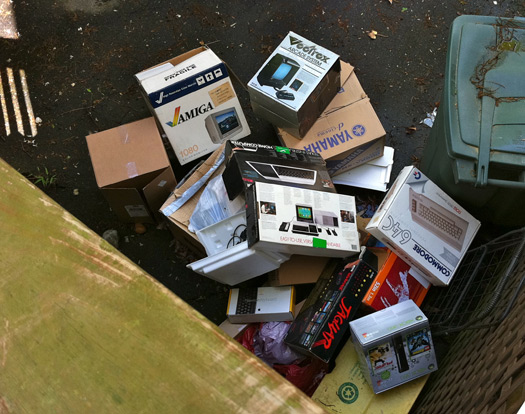
Letting the Boxes Go: A Tale of Sadness

This past weekend we had some water issues in the basement (the unfinished, non-Byte Cellar part of the basement) tied to our A/C unit. In hunting down the problem, I had to displace many of the boxes in which my retro treasures came to me. And, after the issue was all patched up, I was forced to again evaluate my stance on saving these cardboard vessels of years past from which hatched so much vintage computing goodness.

Most retro computer collectors value the inclusion of the original box in any acquisition, and I’m no different. But, the problem is, once the hardware inside is removed and properly set up, the boxes simply section off valuable spaces of air in my basement. And I’ve decided I just can’t afford that in my tiny basement storage areas.

So, I let almost all of them go.

Is it with some sadness? Definitely. But, in a way, it feels good. After all, my computer room was already used as an example of grievous hoarding. Poor girl…

Posted in Just Rambling, Multi-Platform | 7 Comments

My Father the NASA Engineer: A Year After His Passing

My father, James Claude Patterson Jr., died on April 26, 2010 — almost exactly one year ago. He was just shy of 83 years old.

Dad was a retired NASA engineer who worked for the government space agency for 35 years. (It was known as NACA when he started there.) He was an aeronautical engineer heavily focused on eliminating the induced drag that is wingtip vortex. He was involved in a number of high profile projects such as the X-15 experimental rocket plane, the supersonic transport (SST), the supercritical airfoil (on Dick Whitcomb’s team, my father was the member who repeatedly adjusted the physical shaping of the wind tunnel models’ auto body putty (mentioned in the previous link) during evenings at home in our garage, I well recall), the Whitcomb winglet, and the Wingtip Vortex Turbine.

After retiring from NASA, he continued his research for a number of years at NASA research firm ViGYAN, Inc.

Shortly before he died, he was invited back to NASA for a series of interviews about his life’s work. I wanted to share a bit of this. The video that follows is a short clip of my father discussing wingtip vortex. Have a look.

Other videos can be found here.

In 2005 my father wanted to share some of his basic thoughts about wingtip vortex flow with a few of his post-NASA contacts, and I helped put his handwritten copy and sketches together into a digital document. Those interested can have a look at The Nature of the Wingtip Vortex Flow by James Claude Patterson.

Shortly after his death, I posted a Flickr photoset of images of and around him. Those interested can have a look.

I miss you, dad. Thanks for the science — and everything else.

UPDATE: NASA has, since, placed a nice profile of my father online, under their Langley Legacies historical project. It was very nice to discover this.

Posted in Just Rambling, Uncategorized | Tagged , , , , , , | 14 Comments

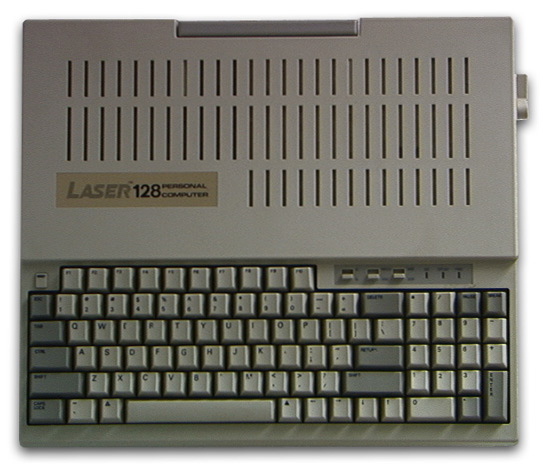
Laser 128: The Apple II From My Past That Wasn’t

My first Apple was an Apple //c that I got in early 1984, right after it launched. It began my still-quite-saucy love affair with the Apple II and was just the first of many different Apple II systems I’d come to own over the years.

Now, I’ve moved through many different systems since then and, as many of those years were in my pre-professional days (read: no money) and also since I didn’t start actually collecting until around 2000, I rarely had more than one computer system at a time. I’d sell system x to basically fund system y.

One of the rare instances back in those days where I had more than one system was in 1987 when I was driving a sweet Atari 520ST setup. I’d recently sold a well-expanded Apple IIe system to jump up to the Atari and, so, in the closet went my boxes of Apple II disks while the Atari took center stage. But, after a while, I really missed playing those Apple II games. I didn’t want to drop the Atari, but I didn’t have the cash to grab an Apple II, either.

And that’s when I bought a Laser 128.

Video Technologies (or VTech) brought the Laser 128 to market in 1986. It was an Apple //c clone that was a follow-up to their Apple ][+ clone, the Laser 3000 (which I also owned, but only for a few days — that’s another story). It could be had for $395, which is far less than Apple was charging for the //c or IIe at the time.

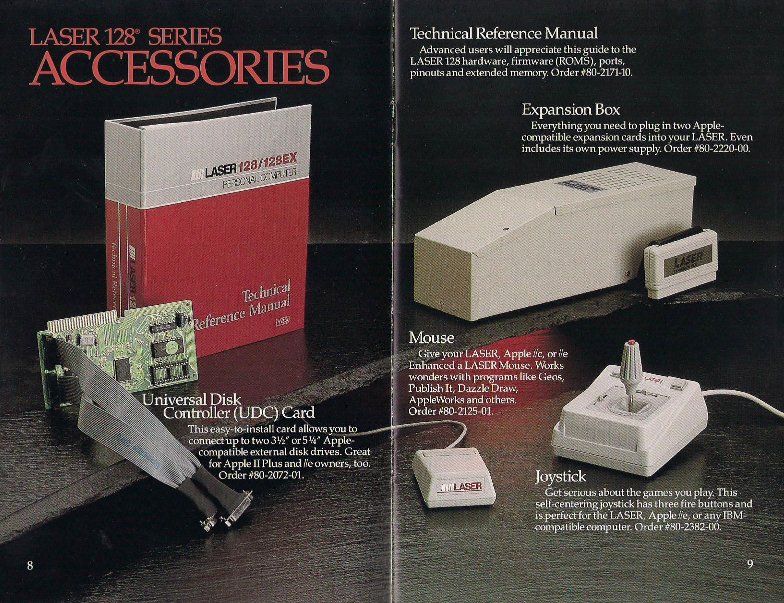
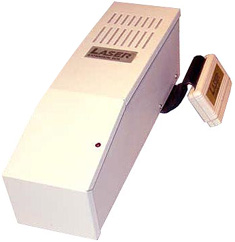
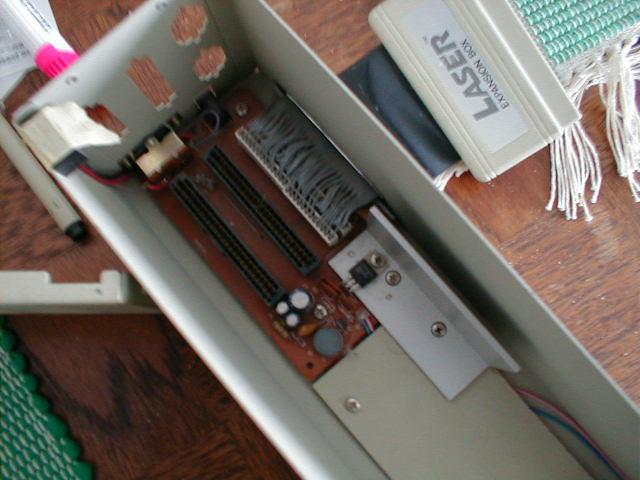
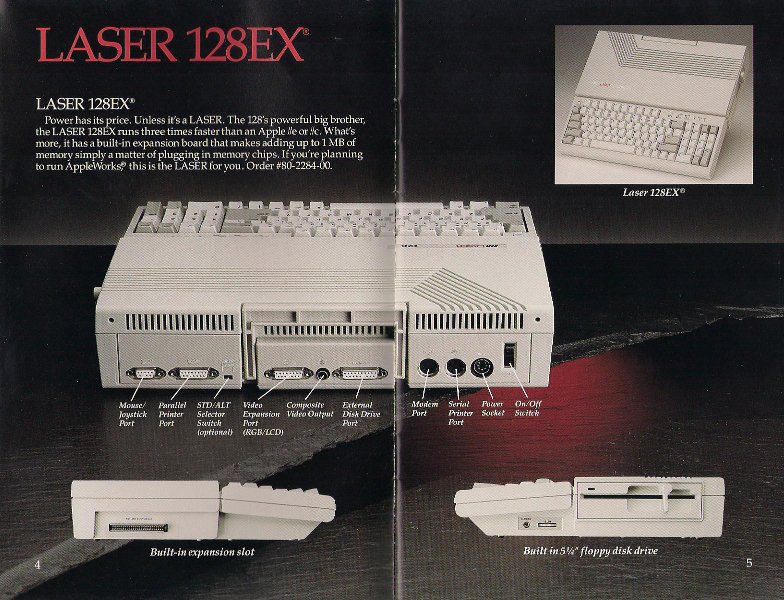
The Laser 128 featured all of the integrated ports of the Apple //c, but it didn’t stop there. The machine also sported a parallel printer interface (Apple was serial-only), both digital and analog RGB out, as well as a IIe-style expansion slot on the side of the unit to which a 2-slot card cage could be attached (slots 4 and 7), allowing for much greater expansion flexibility than the Apple //c and many more built-in features than the Apple IIe. It’s was something of a “best of both worlds” situation.

I grabbed the Laser 128 and held my breath, expecting something of a compromised, rough ride. But what I experienced was nothing close to a compromise, but perhaps the best 8-bit Apple II experience I’d ever had. The machine ended up being 99.8% compatible with the //c, and I was so happy with it that I added the card cage and a Mouse Systems A+ optical mouse to the machine. In the card cage went a Mockingboard C soundcard and the Prometheus ProModem 1200A I’d been holding on to, a relic from my 1986 Apple IIe system (and my first modem).

I never encountered any program that would not run perfectly on the machine and I fully enjoyed the enhanced sound and telecommunications capabilities that the expansion box enabled. It was a wonderful system that really added a lot of fun to my day-to-day computing experience way back when.

The machine I owned was the first iteration of the Laser 128. It was something of an odd looking beast. A Millennium Flacon, of sorts. Some time later, VTech released a more stylish unit in the form of the Laser 128 EX and EX/2, the latter featuring a processor accelerator (3.6MHz vs 1.02MHz) that caused it to eventually push Apple to release the accelerated Apple //c+. The high school I attended bought a batch of Laser 128 EX units to fill a “writing lab,” and I am not exaggerating when I say that at least half of them gave up the magic smoke at some point — and I mean that literally. The engineering quality of those machines was highly suspect. I never had a lick of trouble with my original Laser 128, though — and it got some serious use.

A big part of the appeal of the machine was the whole “I’m getting away with something” feel that it delivered. But, according to the courts, VTech was not “getting away with” something; they reverse engineered the Apple II ROMs and legitimately licensed Applesoft BASIC from Microsoft — so they were immune from the Apple law suits that did come their way. The Laser 128 was the only 100% legal Apple clone ever sold.

I was using a fully expanded “Apple II,” but there’s no way I could have afforded an actual Apple at the time to serve as a secondary computer. It was great!

It would probably be silly for me to try and source a Laser 128 setup for my own Byte Cellar, owning an Apple IIgs, a IIe, and a //c as I do. But a part of me wants to. It was a great machine at the right time for me, and I imagine I’m not the only one who had a whole lot of fun with this non-Apple.

A short time later, VTech started selling low-end IBM PC clones in the Laser 128 form factor but, in time, backed out of the clone business entirely. The company is currently focused on electronic toys for kids. My daughter Rory’s first computer was a $75 VTech cartridge-based, battery-operated, kid-friendly unit that hooks to the living room TV with orders of magnitude more horsepower than even the Laser 128EX/2.

[ Laser 128 expansion box photos courtesy of Digital Obscuria ]

Posted in Apple II | 19 Comments

My SDCard HxC 2001 Floppy Emulator Adventure

One of the problems (and hassles) of playing with certain vintage computers today is their dependence on floppy disk media.

While floppies manufactured way back when keep their bits together far longer than you might think — around 95% of my Apple II 5.25-inch floppies from the late ’80s are fully readable — time does take its toll. “New” double density 5.25- and 3.5-inch floppies are basically impossible to source, though random sacks of used floppies are pretty easy to find on eBay. But, even so and despite the charm of occasionally sliding a floppy into a drive, we’ve all long ago gotten used to launching apps from a fixed disk, making the floppy shuffle a bit of a hassle.

Happily, some nice solutions to the retro computing fan’s floppy disk problems have started emerging in the last few years, thanks to the numerous, easy to work with microcontroller kits that have become available. I’ve seen microcontroller-based floppy emulators that serve up disk images from flash storage arrive for many of the beloved platforms of old.
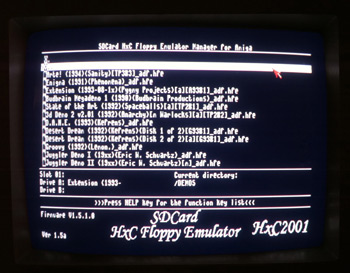
The most flexible of these I’ve seen is the SDCard HxC Floppy Emulator. This device works with any system utilizing a Shugart / IBM PC floppy interface and, as such, sports an impressive list of compatible systems, including:

Computers: Amiga, Atari ST and Falcon, Amstrad CPC464 and CPC6128, MSX2, IBM PC compatible, TI-99/4A, NEC PC88, Sharp X68000, Sam Coupe, ZX Spectrum, TRS-80, Dragon 32 and 64, ACT/Apricot, Perkin-Elmer Model 3030, Kaypro 4-84

Keyboards / Samplers: Ensoniq EPS and Mirage, Emax and Emax II, E-mu Emulator and Emulator II, Oberheim DPX1, Korg DSS-1, Yamaha Clavinova CVP-83S, Prophet 2000, Roland S-50

I ordered one from Lotharek in Poland (for around $110) and a few days later it arrived here in the states.

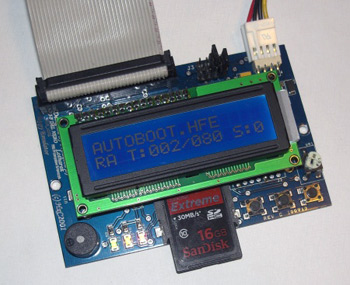
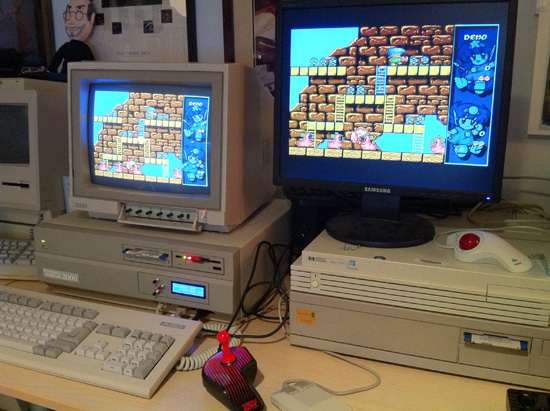
The SDCard HxC Floppy Emulator comes with an attached 2-line, backlit LCD display which is used, in conjunction with three control buttons, to browse the disk images on the inserted SD card and select titles for mounting. Disk selection on the system I bought the unit for, my Amiga 2000, is made even easier thanks to a downloadable Amiga disk image that loads a disk selection program on the Amiga, giving a much clearer view of the available images.

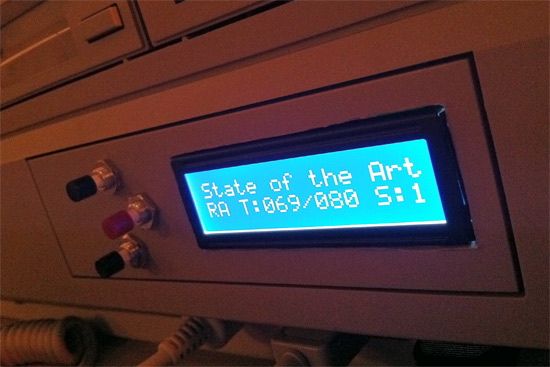
Despite the Amiga loader program, I still wanted to keep the unit’s LCD and control buttons in easy reach, so I used drill and Dremel to install the (detachable) LCD and a set of external buttons in my Amiga’s unused 5.25″ drive bay faceplate.

The results are pretty nice, I think.

I’ve had great fun with the newly enhanced system so far, but I’ve still got to site down and fully populate the SD card with hundreds of games and demos. I do wish the Amiga disk image loader program featured a PAL / NTSC softswitch, as my Fat Agnes can’t take a physical switch at J102. And next I definitely need a floppy emulator for my Apple IIs, several of which are happily in the works right now. (More on that when there’s more to tell.)

A tip of the hat goes to Andy Taylor and his Retro Computers blog. It was a post of his in late March that put the HxC 2001 on my radar.

Posted in Amiga, Just Rambling | Tagged , , , | 16 Comments

A Trove of Apple Promo Videos from the ’80s and ’90s

For a few years now I’ve been sitting on two DVDs full of Apple promotional videos that someone put together and auctioned on eBay. Happily, most of the content was new to me.

The videos promote various Apple systems, primarily the Macintosh but also the Apple II, Apple III, Lisa and Newton MessagePad. They were put out in the ’80s and early ’90s, but I’m not sure of the intended audience for all of them. Years ago I saw the Newton video on a PBS station, but some of these may have been only internally distributed.

I finally got around to ripping these off the DVD and uploading them to YouTube for folks to see. I’d love to hear any info readers have to offer about these videos in the comments, and hope that folks enjoy them.

Apple of the Future Video


[ See Part 2 of this video ]

The first part of this video is an Apple User Group Connection piece made in 1987 that pretends to be a series of news and product clips from 10 years in the future (1997). It speculates on what the Apple of the future will look like. It’s definitely a tongue-in-cheek piece — cheesy and cute.

The second part of this video is a presentation entitled “An Introdution to Business Graphics” made in 1982 that strives to sell the Apple II and Apple III to the corporate world.

People in this video: John Sculley, Del Yocam, Steve Wozniak, Mike Spindler, Apple engineers

Apple Promo Videos, Ads of the ’80s

This video stars off with the “Power and Motion” video with a flowing water motif, naming members of the Macintosh line-up, from Macintosh Plus to Macintosh IIcx and the Macintosh Portable. It ends with then-CEO Jean-Louis Gassée having a sip of water himself. Cute. It’s is followed by a series of Apple Macintosh promotional sketches (“The Pitch”, “The War Room”, “Power Lunch”, “After Hours”) followed by three “The Power To Be Your Best” Apple IIgs ads.

I believe all of the content in this video is from the ’80s.

Apple Promo Video from Early ’90s


[ See Part 2 and Part 3 of this video ]

This is a three part video (due to YouTube length constraints) that makes up an Apple promotional piece, a full 36 minutes long, that promotes the Macintosh, the Apple II, and the company itself. It contains a portion of the Apple “Knowledge Navigator” video.

People in this video: Saiva Siddhanta monks, Javier Mariscal, John Sculley, Alan Kay, Jean-Michel Jarre, Steve Wozniak, Diane Ravitch, Alvin Toffler, Ray Bradbury

Presumably this video was released in the early ’90s.

Apple Video Recalling the Early Days

This is an Apple promotional walk down memory lane that recounts the creation of the company, the Apple I, and the Apple II with commentary from Steve Jobs, Steve Wozniak, and others.

Presumably this was produced in the 1980s.

Apple Presents a Revolutionary Idea: Macintosh


[ See Part 2 of this video ]

This video is an ’80s Apple promotional piece that explains the Macintosh, with commentary from several members of its design crew.

People in this video: Burrell Smith, Andy Hertzfeld, George Crow, Bill Atkinson, Mike Murray

Apple’s Future Computer: The Knowledge Navigator

This is Apple’s famed early ’90s “Knowledge Navigator” video, the brainchild of then CEO John Sculley. It’s Apple’s look into the future, back then.

Your World, Your Newton – ’90s Apple Promo Video

“Your World, Your Newton” is an early ’90s Apple promo video meant to introduce viewers to the Apple Newton Message Pad.

There’s also a late ’80s Claris video. But it’s not as exciting to me as the rest. And this post is pretty long already. So, here.

Posted in Apple II, Handhelds, Macintosh, Other Platform | 23 Comments