

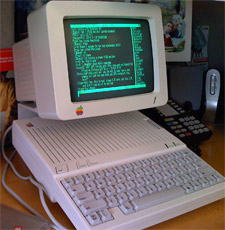
Several months ago – maybe more like a year or two ago now, I purchased an Apple //c in mint condition and didn’t really have a plan for just where I would house this little treasure. You see, my second computer was an Apple //c (after my TI-99/4A), puchased in April 1984. It was a great experience owning and using that machine at the age of 12. I finally sold it and moved to the Mac, and then Amiga, and then Apple II again, and then… Well, let’s not get carried away. This story is about the //c – the //c I recently purchased.
So the //c has been in my office since I purchased it. About two years now, I suppose. I’ve booted it seldom enough times to count on one hand – a sad situation. Well, I recently encountered a story that gave me a reason to use my //c a little more frequently – as in every day. It seems that Paul Weinstein put an Apple //c into his office setting, tied to his Mac mini via serial link, and proceeded to use the //c as a text terminal for IRC chatting. An avid IRC user myself, with a Mac mini and Apple //c already in my office, I had little choice but to folllow his lead. The result is most satisfying.
Sitting next to my office workstation setup is an Apple //c, complete with a 9″ monochrome Apple Monitor //c and stand (all beautifully designed by frog design inc.) serving full time, 8-hour per workday duty as a serial terminal to my my Mac mini. A custom 5-pin DIN (//c end) to 8-pin mini-DIN (Mac style) null modem cable of my own (sloppy) creation ties the //c to a Keyspan dual USB-serial adapter plugged into my mini. The //c is running Modem MGR, a popular and flexible terminal application (three 143K floppies in size) that is providing VT220 emulation. 9600bps seems the fastest that the //c can handle in this configuration – slow, but adequate for the role of a text terminal. (It actually seems pretty fast given that 1200bps is the fastest speed at which I’ve ever used an Apple II terminal emulator – on my IIe with internal Prometheus ProModem 1200A back in 1986.)
The //c spends basically all of its time serving as an IRC chat terminal, displaying a shell session of either irssi or Rhapsody, both terminal-based IRC clients, running on my remote Linux server by way of a secure shell connection. It’s a rather abstracted approach, but it’s great to twiddle the //c’s keys in a meaningful way every workday.
I’m rather enjoying the setup, and it’s certainly generated many a raised eyebrow and curious look as folks pass by my office. At any rate, I hope you’ve enjoyed my tale and my photo gallery chronicling this project.
Also check out:
- Apple IIe as terminal to a Linux box
- How to use an Apple IIgs as a Linux terminal
- Buy an Apple II ethernet card…if you’re too good for serial
- Apple Newton eMate 300 as a serial terminal
- How to use an Atari ST as a Linux terminal
- C64 or C128 as a terminal for Linux
- Using an 8088-based XT-class PC as a Linux dumb terminal
- Using a Qume serial terminal with Linux
::: Digg this story! :::
Nice to see someone else getting inspired. We like to joke at my office the that //c is the secret computer that’s running the whole company – everything else being for show. Oh and by the way, I don’t have a photo of it, but the kickstand is up now ;-)
Wow…pretty cool! But you know what would be *really* cool? (And as a former TI user at the same age, I agree it was an awesome first computer. Do you still use yours?) Anyway, you probably know what I’m going to suggest, but how about using the TI-99/4A as a Darwin terminal interface for the Mac mini?
As I was reading your article, I was trying to think of a way to do this with my AppleTV, as I know it’s possible to SSH into that little puppy. Of course I’d have to buy another TI as I don’t have the same machine, but it would be worth it just for the fun if this could be done. Curious to hear your thoughts!
Ah, but…40 columns on the TI-99/4A. That might be a little cramped, I fear. Unless one were to go mad with retro and setup a 99/4A with a rare 80-column card. Or go right to the Geneve, for that matter. THAT would be hardcore.
http://en.wikipedia.org/wiki/Geneve_9640
I just want to let you know I had the same computers: first a TI-99/4A and then the apple //c, what a coincidence! Great computers, and have fond memories when I was about 13…
Congratiulations on your great gadget!
Nice, Javster. I got the TI-99/4A for Xmas in 1982 when I was 10. I was days shy of 12yo when we got the Apple //c in April of 1984.
The //c definitely felt more “capable” than the TI, though the TI surpassed the Apple in certain ways. It (the TI) suffered from a really poor architecture, sadly; it was slow despite being the first 16-bit “home computer.”
Nice to see new uses for old Apples! We should have you on our show, RetroMacCast. Whaddya think?
James
http://www.retromaccast.com
Just added a link to the set of related links at the bottom of the article to an Apple Newton eMate 300 put to use as a serial terminal. I’ve got an eMate 300 (got it new a few years ago) that I’ve got to wire up to…something. My Mac Pro maybe? Hmm…
My eMate is just sitting there in a protective bag right now. Not for long… :-)
Great… Could you include pinouts for the serial port so some crazy fool who’s buying a IIc+ from a guy (erm, me) can hook it up to a linux box and do crazy things like, use it as a terminal, download Oregon Trail disk images to a floppy and play……
Thanks!
How did you configure the Mac mini for the serial terminal? I recently tryed the same with my Apple /// and my iBook, and also with a Keyspan USB adaptor. But I didn’t get it to work. I tried much, like adding the following line to the /etc/ttys file:
tty.USA28191P1.1 “/usr/libexec/getty std.9600” vt100 on secure
but I don’t get the Darwin prompt, like in your first Image.
Did you ever think about using an Apple //c Plus? Not only is the chip faster (4mhz vs 1mhz) to allow faster baud rates but it has a higher capacity disk drive so you only need one floppy.
Hello, sorry if I do not write well yours to speak but I am using a service on line, I have since you have apple a //c, of it have also I that I would want to only restore that I have a problem, when I ignite it the system it leave but the spy of the floppy one like trying a start disc ignites itself. You would know give an aid in order to understand what to me eventually lacks to it and to supply a copy to me of what it tries? salutes
Hi
I have tried Mac Pro to //c and failed, nothing or garbage on the //c screen.
what revision of the //c are you using? 255 0 3 or 4
Loren: I have a rev 3. Did you set the baud rate on your //c terminal program to match what’s been configured on the Mac side? I also recommend using a VT-100 capable term program like ModemMGR or ProTerm on the //c.
Using a Keyspan serial adapter on the Mac? Did you use the process shown here? http://wiki.robotz.com/index.php/Apple_IIc
Also, are you sure your null-modem cable is wired properly?
Pingback: Apple //c Serial Terminal in the Byte Cellar | Byte Cellar
Pingback: My DIY Downloader » ElgarTech
Pingback: Adventures with my Apple IIc Part 1 | duxbridge
Pingback: The Apple //c Makes It to the Office…Again | Byte Cellar
Pingback: MacBook Pro 17″ & 15″ Battleship | Devices On The Move
Pingback: Firing Up the Apple //c for "Not x86 Week" - Byte Cellar